






The site you are reading runs on this stack. circlemount.com is a TanStack Start app, deployed as one Cloudflare Worker that reads its pages and articles from Supabase. It started as a Lovable project; in November 2026 we replaced Lovable's build wrapper with our own Vite build and moved hosting to Workers. Pushes to main now go live in about two minutes.
Below is the setup step by step, with our real config (sanitised) and the mistakes we made. Figures were checked on official documentation on 21 November 2026; prices are in US dollars, exclude VAT and are as of November 2026.
- Workers Paid costs $5 a month per account and includes 10 million requests and 30 million CPU milliseconds.
- Static asset requests are free and unlimited, and Workers has no egress or bandwidth charge.
- Keep Supabase keys in Worker secrets, never in
varsor aVITE_variable. - supabase-js over HTTPS is the simple default; Hyperdrive with
pgis for direct Postgres access. - Workers Builds deploys from GitHub, and a failed build leaves the previous version serving traffic.
Why run a full-stack app on Cloudflare Workers with Supabase?
Because it splits the job cleanly. The Worker renders pages and runs server code close to the visitor. Supabase holds the Postgres database, sign-in and file storage in one region.
What we like, after running it in production:
- Price. The Workers pricing page sets a $5 monthly minimum for the Paid plan, states "Requests to static assets are free and unlimited", and says there are no additional charges for egress or bandwidth.
- Global by default. There is no Worker region to choose.
- Git builds, previews, rollback and logs are built in.
The trade-offs are real, and you should know them before you start:
| Question | Workers with Supabase fits well | Think again |
|---|---|---|
| What does a request do? | Renders a page, calls an API, writes a row | Runs long jobs, video processing or heavy maths |
| Which framework? | TanStack Start, or another framework with a Cloudflare guide | A Next.js app that relies on features vinext does not support yet |
| Which Node.js packages? | Modern packages that use fetch and Web APIs | Packages needing child processes, native add-ons or worker threads |
| Where are your users? | Near your Supabase region, such as the UK with London | Spread worldwide, with many database calls per page |
The biggest one is distance. The Worker runs near the visitor, but the database sits in one Supabase region. Every query is a network round trip to that region, so a page that makes five queries one after another pays that latency five times. Group queries into one call or a Postgres function, and cache what you can. Cloudflare's Smart Placement can also run the Worker closer to the database when that is measurably faster.
What are the limits of Cloudflare Workers?
Workers are short-lived, memory-capped functions, not servers. For a typical web app, the Free plan's 10 ms of CPU per request is the limit you hit first; on Paid it is rarely an issue.
- 10 ms of CPU time per request on Free; 30 seconds by default on Paid, configurable up to 5 minutes
- 128 MB of memory per isolate on both plans
- 64 MiB maximum uncompressed Worker size
- 100,000 static asset files per Worker version on Paid (20,000 on Free), each up to 25 MiB
CPU time is not wall-clock time: waiting for Supabase does not count, and HTTP-triggered Workers have no hard duration limit. Node.js support comes through Node.js compatibility: Buffer, crypto, streams and similar modules work, but node:child_process and node:worker_threads are non-functional stubs. If a package depends on them, it will not run.
How do you set up a TanStack Start app on Cloudflare Workers?
For a new app, Cloudflare's TanStack Start guide scaffolds everything with npm create cloudflare@latest -- my-app --framework=tanstack-start. For an existing app, it adds @cloudflare/vite-plugin and wrangler, puts the Cloudflare plugin before tanstackStart() in vite.config, and adds a wrangler.jsonc file.
We took a slightly different route, because our app came from Lovable with Nitro already in the build. We kept Nitro and set its cloudflare-module preset, which writes the server bundle to .output/server and the static files to .output/public. Both routes produce a Worker. Our wrangler.jsonc, with the identifiers swapped for placeholders:
{
  "$schema": "node_modules/wrangler/config-schema.json",
  "name": "my-app",
  "main": ".output/server/index.mjs",
  "compatibility_date": "2026-10-01",
  "compatibility_flags": ["nodejs_compat"],
  "assets": { "directory": ".output/public", "binding": "ASSETS" },
  "observability": { "enabled": true },
  "vars": { "SUPABASE_URL": "https://<your-project>.supabase.co" }
}
Line by line: name must match the Worker's name in the dashboard, or Git builds fail. main is the built server entry. assets serves the static files, so those requests are free and never run your code. nodejs_compat is needed by many libraries; it is on by default from compatibility date 2026-08-04, and keeping the flag does no harm. observability turns on Workers Logs. The only vars entry is the Supabase URL, which is public anyway.
Run npm run build, then npx wrangler deploy, and the app is live on a workers.dev address. In server code, Cloudflare's guide reads bindings and secrets by importing env from cloudflare:workers.
Where do Supabase keys and secrets go on Cloudflare Workers?
In Worker secrets, set with npx wrangler secret put SUPABASE_SECRET_KEY or in the dashboard. Cloudflare's secrets documentation is direct: "Do not use vars to store sensitive information." Secret values are hidden in Wrangler and the dashboard once set, and each secret put deploys a new version straight away.
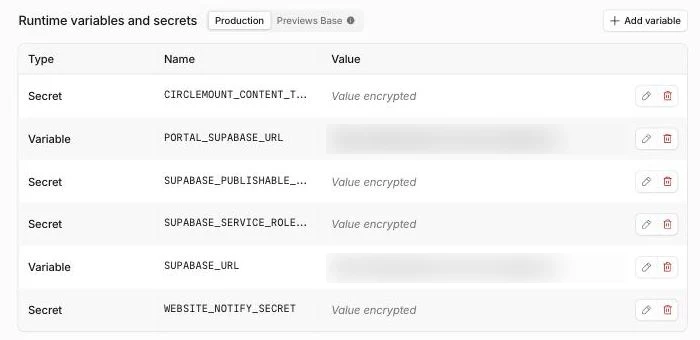
Our Worker's settings: public values are plain variables, while every key is an encrypted secret that can't be read back.
Mixing up these four places is the most common mistake we fix:
| Where | What goes there | Who can see it |
|---|---|---|
vars in wrangler.jsonc | Public settings, such as the Supabase URL | Anyone who can read the repo |
| Worker secrets | The Supabase secret key, Stripe keys, webhook secrets | Your server code only |
| Workers Builds variables | Values needed at build time, such as VITE_ settings | The build only, not the running Worker |
.dev.vars or .env | Local copies for development | Your machine; add both to .gitignore |
Two details catch people out. The Workers Builds configuration page says "Build variables will not be accessible at runtime", so set a value needed in both places twice. And anything with a VITE_ prefix is baked into the JavaScript every browser downloads. That is fine for the Supabase publishable key, which Supabase's API keys guide calls safe to expose. It is never fine for a secret key, which bypasses Row Level Security; of secret keys, Supabase says "Never put one in a browser, a shipped application, or source control."
Should you connect to Supabase with supabase-js or Hyperdrive?
Start with supabase-js. It talks to Supabase's REST API over HTTPS, works in a Worker with no special setup, and keeps Row Level Security and Supabase Auth in the loop. It is what circlemount.com uses. Cloudflare's Supabase integration guide needs only the project URL and key as secrets, then createClient(env.SUPABASE_URL, env.SUPABASE_KEY).
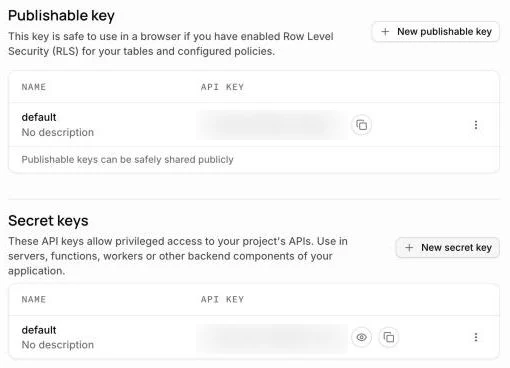
Supabase's publishable key can sit in the browser behind Row Level Security; the secret key belongs only in Worker secrets.
Choose Hyperdrive when you want raw SQL: an ORM such as Drizzle, transactions across several statements, or reporting queries. Hyperdrive sets up and pools database connections at Cloudflare's edge, and can cache read queries. The Hyperdrive guide for Supabase says to use the Direct connection string, because Hyperdrive does its own pooling, and to use pg 8.16.3 or later rather than supabase-js:
npx wrangler hyperdrive create my-db --connection-string="postgres://<user>:<password>@db.<your-project>.supabase.co:5432/postgres"

// wrangler.jsonc
"hyperdrive": [{ "binding": "HYPERDRIVE", "id": "<hyperdrive-config-id>" }]| Capability | supabase-js (HTTPS) | Hyperdrive with pg |
|---|---|---|
| Works on the Workers Free plan | Yes | Yes, up to 100,000 queries a day |
| Needs only the project URL and an API key | Yes | No, needs a Postgres connection string |
| Row Level Security applied per user | Yes | No, runs as the database role you connect with |
| Supabase Auth and Storage helpers | Yes | No |
| Raw SQL and multi-statement transactions | Partial, through Postgres functions | Yes |
| Connection pooling at Cloudflare's edge | No | Yes, at no extra cost |
| Query caching | No | Yes, at no extra cost |
| Needs nodejs_compat | No | Yes |
Sources: Cloudflare, Supabase integration, checked November 2026; Cloudflare, Connect Hyperdrive to Supabase, checked November 2026; Cloudflare, Hyperdrive pricing, checked November 2026
Hyperdrive connects as a database role, so Row Level Security does not protect you and your Worker code becomes the only access check. Give that role the smallest privileges that work.
How do you deploy from GitHub with Workers Builds?
Open the Worker in the dashboard, go to Settings, then Builds, and connect the GitHub or GitLab repository, as the Workers Builds guide describes. Set the build command and leave the deploy command as npx wrangler deploy. Ours installs with bun install --frozen-lockfile, then runs bun run build. Every push to the production branch deploys. Other branches get their own preview URL, ideal for checking a change before it reaches customers.
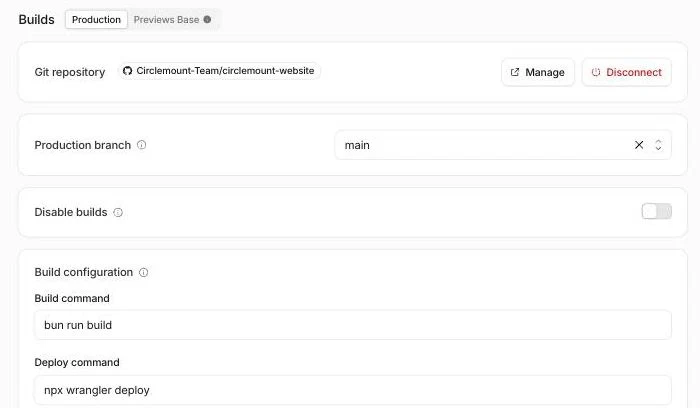
Workers Builds for circlemount.com: every push to main runs bun run build, then npx wrangler deploy.
- 3,000 build minutes a month on Free, with 1 build at a time
- 6,000 build minutes a month on Paid, then $0.005 a minute, with 6 builds at a time
- 20 minutes is the build timeout on both plans
Source: Cloudflare, Workers Builds limits and pricing, checked November 2026
The frozen lockfile lesson
Our first automatic build failed before it built anything. We had removed Lovable's build package from package.json, but bun.lock still listed it. As Bun's install documentation explains, a frozen install uses the exact locked versions and fails on any mismatch. The fix: run bun install --lockfile-only, confirm the frozen install passes locally, and commit both files together. Never drop the frozen flag to make a build pass. Reassuringly, the failed build changed nothing: the previous version kept serving traffic.
How do you add a custom domain, roll back and read logs?
- Custom domain. The domain must be an active zone on Cloudflare. Under Settings, then Domains and Routes, add a Custom Domain, and Cloudflare creates the DNS record and certificate. The custom domains guide notes that
example.comandwww.example.comare separate, so redirect one to the other. Add the domain to Supabase's auth redirect URLs before switching DNS. - Rollback. In Deployments, pick an earlier version and choose Rollback, or run
npx wrangler rollback. The rollbacks guide allows the 100 most recent versions. A rollback does not undo database changes, so make migrations backwards compatible. - Logs. With observability on, Workers Logs records requests and errors. It includes 200,000 events a day on Free and 20 million a month on Paid; Cloudflare says that from 1 December 2026 it moves to Cloudflare Observability pricing.
Can you host a Lovable or Next.js app on Cloudflare Workers?
Yes, and we know the Lovable case best, because circlemount.com made that move. Lovable projects created since May 2026 use TanStack Start, so they follow the setup above. Our guide to moving an app off Lovable covers the backend: exporting Lovable Cloud, restoring into your own Supabase project and cutting over the domain. Still deciding? Taking a Lovable app to production covers staying put.
Our order for a Lovable app: turn on Git sync, swap Lovable's Vite wrapper for a plain Vite config, add wrangler.jsonc, remove Lovable-only services, move keys into Worker secrets, regenerate the lockfile, and deploy to a workers.dev address before touching DNS. We have done this for client apps repeatedly, and the same, solvable problems come up each time.
For Next.js, Cloudflare's Next.js guide now recommends vinext as the default, while it is in beta, and keeps OpenNext for existing apps that cannot migrate yet. Run the compatibility check first. If a feature you rely on is unsupported, compare the options in our Cloudflare Workers vs Vercel guide.
How much does Cloudflare Workers with Supabase cost?
For most small business apps, $5 a month plus your Supabase plan. Workers Paid includes 10 million requests and 30 million CPU milliseconds, then charges $0.30 per extra million requests and $0.02 per extra million CPU milliseconds. Static asset requests are free and do not count.
Our calculation from Cloudflare's published prices. It assumes every request runs code at 5 ms of CPU on average; static asset requests would be free.
| Dynamic requests a month | Workers bill |
|---|---|
| 2 million | |
| 5 million | |
| 10 million | |
| 20 million | |
| 50 million | |
| 100 million |
Supabase is billed separately. Its pricing page starts Pro at $25 a month, and the Free plan pauses projects after a week of inactivity and has no automatic backups, so do not run a business app on it. But Workers' free egress does not make Supabase's free: Supabase's egress guide meters data sent out to connected clients, and your Worker is one. Our breakdown of egress costs across Supabase, Vercel and Railway shows where that bites, and Railway vs Cloudflare vs Vercel compares the hosts side by side.
For UK businesses, put the Supabase project in West Europe (London), eu-west-2, from the Supabase regions list. That keeps data at rest in the UK and close to your users. The Worker still runs wherever is nearest each visitor, so record both providers. The ICO's guidance on what privacy information to provide also expects your privacy notice to say who receives personal data and whether it is transferred outside the UK.
What should you check before launching on Workers and Supabase?
We run this list before launch, and again after the first week of real traffic:
- Deploy to a workers.dev or preview URL and test every page, including deep links
- Confirm no secret key appears in vars, VITE_ variables or the browser bundle
- Test Row Level Security as a signed-out user and as a second user
- Check the lockfile passes a frozen install, then connect Workers Builds
- Add the custom domain and the Supabase auth redirect URLs
- Turn on observability and check for errors under real traffic
- Practise a rollback once, before you need one
- Move Supabase to Pro and confirm backups are running
For the security side in more depth, use our vibe-coded app security checklist. If payments are involved, read fixing Stripe webhooks with Supabase before launch day. And if your app is half-built or broken after an AI tool got it most of the way, we can fix the vibe-coded app and put it on this stack, or build an MVP on it from scratch.
Frequently asked questions
Can I use Supabase with Cloudflare Workers?
Yes. Install supabase-js, store the project URL and key as Worker secrets, and create the client inside your Worker. It talks to Supabase over HTTPS, so it needs no special setup. For direct Postgres access, Cloudflare's Hyperdrive with the pg driver connects to Supabase's direct connection string instead.
Is Cloudflare Workers free for a small app?
The Free plan allows 100,000 requests a day with 10 milliseconds of CPU per request, which suits prototypes but is tight for server-rendered pages. The Paid plan costs $5 a month per account, as of November 2026, and includes 10 million requests and 30 million CPU milliseconds a month.
Do I need Hyperdrive to use Supabase on Cloudflare Workers?
No. Most apps work well with supabase-js over HTTPS, which keeps Row Level Security and Supabase Auth helpers. Hyperdrive is for raw SQL, ORMs such as Drizzle, transactions and reporting. It pools connections and caches queries at no extra cost, but it connects as a database role and skips Row Level Security.
Can I host my Lovable app on Cloudflare Workers?
Yes. Newer Lovable apps use TanStack Start, which Cloudflare supports. Sync the code to GitHub, replace Lovable's build wrapper with a plain Vite config, add a wrangler.jsonc file, move keys into Worker secrets and deploy. Moving the Lovable Cloud backend to your own Supabase project is a separate step.
Does Cloudflare Workers charge for bandwidth or egress?
No. Cloudflare's pricing page says there are no additional charges for data transfer or bandwidth on Workers, and static asset requests are free and unlimited. Supabase still meters the data it sends to your Worker as egress, so heavy database reads can still cost money on the Supabase side.
Can Next.js run on Cloudflare Workers?
Yes. Cloudflare now recommends vinext as the default way to run Next.js on Workers, though it is in beta and support varies by feature, so run its compatibility check first. OpenNext remains an option for existing apps that cannot migrate yet. TanStack Start is the simpler path for new apps.
Sources
Checked on 21 November 2026. Product features and figures change quickly, so check the current source before you rely on a detail.
- Cloudflare documentation: Workers pricing
- Cloudflare documentation: Workers limits
- Cloudflare documentation: TanStack Start on Workers
- Cloudflare documentation: Secrets
- Cloudflare documentation: Workers Builds configuration
- Cloudflare documentation: Workers Builds limits and pricing
- Cloudflare documentation: Supabase integration
- Cloudflare documentation: Connect Hyperdrive to Supabase
- Cloudflare documentation: Hyperdrive pricing
- Supabase documentation: Understanding API keys
Want your app running on Cloudflare Workers and Supabase?
We run circlemount.com on this stack, and we move client apps onto it. If your app was built with Lovable or another AI tool and needs to be made production-ready, we can fix the vibe-coded app and deploy it properly; if you are starting fresh, see app MVP development. The initial app assessment is free, project work starts from £1,000 + VAT, and ongoing support plans start from £125 a month + VAT. Join the Circle to book yours.