





Railway is one of the easiest places to run a real server. You connect a repository or a Dockerfile, it builds and runs it, and you pay for what the service uses. That simplicity is why so many apps built with Claude Code, Codex or a browser builder end up on it. The catch is that two things on a Railway bill grow quietly: compute that runs all day, and data sent out to the internet.
This guide explains how Railway pricing works as of November 2026, what actually drives the bill, and how it compares with Cloudflare Workers and Vercel for the same traffic. Prices are from the vendors' own pages, in US dollars, excluding VAT. Circlemount has dealt with egress cost problems on Railway for clients more than once, so the last sections cover the fixes that work and when to move part of an app elsewhere.
- Railway plans: Free with $1 of usage a month, Hobby at $5 including $5 of usage, and Pro at $20 per workspace including $20 of usage.
- Usage is about $20 per vCPU a month, $10 per GB of RAM a month, $0.15 per GB of volume storage and $0.05 per GB of public egress.
- Railway's docs say service-to-service traffic on the private network has no egress fees, and bucket egress is free.
- In our illustrative example of 20M requests and 2 TB out a month, Railway Pro comes to about $120 and Cloudflare Workers Paid to $9.40.
- Railway is strong for always-on servers, background workers, cron, WebSockets and Docker. Bandwidth-heavy front ends are often cheaper on Workers.
- A hybrid often works best: front end on Workers, workers and cron on Railway.
How does Railway pricing work?
Railway combines a plan fee with usage billing. The plan fee is not on top of usage: it is credited against it. On Pro, you pay $20 a month and the first $20 of resource usage is covered. If the services use $30 of resources that month, the bill is $30, not $50.
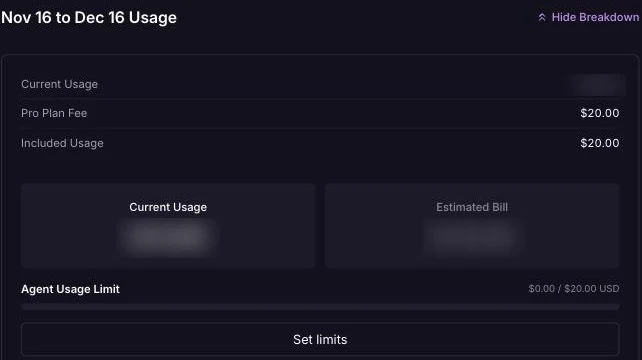
Railway's Pro plan fee comes with the same amount of included usage, and anything above it is billed on top. Our amounts are blurred.
| Plan | Monthly fee | Usage included | Who it is for, in Railway's words |
|---|---|---|---|
| Free trial | $0 | $5 one-time credit for 30 days | Trying Railway, no credit card required |
| Free | $0 | $1 a month | Trying Railway and running a small app at no cost |
| Hobby | $5 | $5 a month | Solo developers and side projects |
| Pro | $20 per workspace | $20 a month | Teams shipping to production; seats included |
| Enterprise | Custom | Custom | Larger organisations |
Pro is priced per workspace, not per seat: Railway's pricing page says "Seats are unlimited and included".
Can you run a business app on Hobby? Railway's pricing FAQ says that for a commercial application it highly recommends upgrading to Pro, for higher limits and priority support. We found no outright ban in the pricing pages we checked, but if customers pay for the app, budget for Pro.
- $20 per vCPU per month, metered on actual use
- $10 per GB of RAM per month
- $0.15 per GB of volume storage per month
- $0.05 per GB of network egress from services
- $0.015 per GB-month of object storage, with free egress
Source: Railway, Pricing, checked 21 November 2026. US dollars, excluding VAT.
Two things are worth knowing. You pay for resources used, not for the size you allow a service to grow to, so a quiet app costs less than its limits suggest. And service builds are free: the plans documentation says Railway does not charge for build CPU, memory or image storage.
What makes a Railway bill go up?
Most high Railway bills come down to one or more of these five things.
- Always-on compute. A web server, worker or database runs around the clock. A service averaging half a vCPU and 1 GB of RAM uses about $20 a month on its own. Three or four of those, plus a database, and Hobby's $5 is long gone.
- Public egress. Every byte a service sends to the internet is billed at $0.05 per GB. That includes HTML, JSON, images, file downloads and streamed responses. An app that serves its own images and uploads pays for every view.
- Talking to a database over the public network. If your app connects to a Railway database through its public URL, that traffic counts as egress. Railway's FAQ lists this as a cause of high usage and says to connect to Railway databases over private networking instead.
- A database on another provider. If the app runs on Railway and the database is Supabase, data can be billed twice. Supabase counts egress on data sent to any connected client, including your backend: on Pro, after 250 GB it charges $0.09 per GB uncached. Then Railway charges $0.05 per GB when your app sends that data on to users.
- Uploads that pass through your service. Railway's bucket billing page says egress from your services to buckets is billed at the standard public rate, even though bucket egress itself is free.
One thing we could not confirm: Railway's current pricing pages list egress but say nothing about inbound traffic. We have not assumed either way. Check the network line in your own usage breakdown.
Is Railway cheaper than Cloudflare Workers or Vercel?
For a small always-on server, often yes. For a bandwidth-heavy web front end, usually no. The difference is egress. Cloudflare's Workers pricing says there are "no additional charges for data transfer (egress)". Vercel Pro includes 1 TB of Fast Data Transfer, then charges from $0.15 per GB. Railway charges $0.05 per GB from the first gigabyte, with the plan credit as the only allowance.
The examples below are illustrative, not quotes. They assume every request runs code at an average of 5 ms of CPU, one deploying seat, and, for Railway, one service averaging 0.5 vCPU and 1 GB of RAM. The database is left out, because it costs the same wherever the app runs.
| Host | (a) 2M requests, 200 GB out | (b) 20M requests, 2 TB out |
|---|---|---|
| Cloudflare Workers Paid | $5: within the 10M requests and 30M CPU-ms included; no egress charge | $9.40: $5 + (20M − 10M) × $0.30 per million = $3.00 + (100M − 30M CPU-ms) × $0.02 per million = $1.40 |
| Vercel Pro, on demand | $20: usage of about $1.56–1.69 is covered by the $20 credit | About $186–191 before memory: 1,000 extra GB × $0.15 = $150, requests $20–24, invocations $12, CPU $3.56–4.92 |
| Vercel Pro, Flat Rate CDN | $20, or $40 if the account needs the $20 tier | About $120: $20 plan plus the $100 tier (50M requests, 50 TB) |
| Railway Pro | $30: compute 0.5 × $20 + 1 GB × $10 = $20, plus egress 200 GB × $0.05 = $10, against a $20 credit | About $120: compute $20 plus egress 2,000 GB × $0.05 = $100 |
Illustrative only, US dollars excluding VAT, database excluded, as of November 2026
| Host | Per month |
|---|---|
| Cloudflare Workers Paid | |
| Railway Pro | |
| Vercel Pro, $100 Flat Rate CDN tier | |
| Vercel Pro, on demand |
Sources: Railway, Pricing; Cloudflare, Workers pricing; Vercel, Pricing; Vercel, Flat Rate CDN, checked 21 November 2026
Read the caveats before you act on these numbers.
- One small Railway service at 20M requests is unrealistic. You would run more compute, so the real figure is higher. The point is that $100 of the $120 is bandwidth.
- The Cloudflare figure is an upper bound. Requests to static assets are free and unlimited on Workers, so a site with many asset requests pays less.
- Vercel's pages differ on included requests. The pricing page lists 10M CDN requests on Pro. The Flat Rate CDN page lists 1M for the tier included with Pro. We used 10M for on-demand pricing. Vercel's Fast Origin Transfer can also add up to about $12 in (a) and $120 in (b) if traffic is dynamic.
- Flat Rate CDN has limits. Vercel says it is not for bulk file distribution or for apps where media delivery is the majority of bandwidth.
- Prices vary by region and exclude VAT. Vercel's London region charges $2.40 per million CDN requests and $0.177 per hour of Active CPU.
For the full Workers and Vercel comparison, read our guide to Cloudflare Workers vs Vercel. For how Supabase, Vercel and Railway each count data transfer, see egress costs on Supabase, Vercel and Railway.
Which workloads suit Railway, Workers or Vercel?
Railway is genuinely good at what serverless platforms find awkward: a normal process that stays up. That suits queue workers, scheduled jobs, WebSocket servers, Docker images with system dependencies, and a simple Postgres or Redis next to the app. Railway's public networking limits say WebSocket connections are exempt from request duration limits and can stay open while idle.
| Workload | Railway | Cloudflare Workers | Vercel |
|---|---|---|---|
| Static front end and assets | Partial: billed as egress unless cached by Railway's CDN | Yes: static asset requests are free and unlimited | Yes: 1 TB of transfer included on Pro |
| Bandwidth-heavy responses (terabytes a month) | Partial: $0.05 per GB from the first GB | Yes: no egress or bandwidth charges | Partial: $0.15 per GB after 1 TB; Flat Rate CDN excludes media-heavy delivery |
| Always-on server or background worker | Yes: a service keeps running, billed on usage | No: request-driven, with CPU capped at 5 minutes per request | Partial: functions end at their maximum duration, 800 seconds on Pro |
| WebSockets | Yes: exempt from request duration limits | Partial: through Durable Objects | Partial: public beta, closed at the function's maximum duration |
Sources: Railway, Pricing; Railway, Public networking specs and limits; Railway, CDN; Cloudflare, Workers pricing; Cloudflare, Workers limits; Vercel, Pricing; Vercel, Functions limits; Vercel, WebSocket support, checked 21 November 2026
The gaps are narrowing. Vercel now runs Docker images and long-lived daemons in beta, and Cloudflare has Containers as a separate product with its own egress charges. Railway also has cron services, with runs at least five minutes apart. For a process that must stay up today, Railway is still the simplest of the three.
How do you see egress in Railway?
Check usage before you change anything, so you fix the service that is actually costing money.
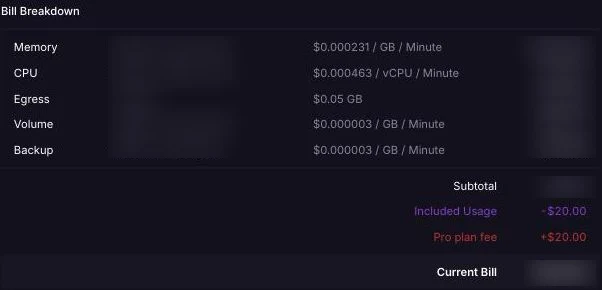
The bill breakdown lists each resource with its unit rate, including public egress at $0.05 per GB. Usage figures are blurred.
- Workspace usage. Open your workspace settings and go to the Usage section. Railway's FAQ says it breaks usage down by project and by resource type, such as CPU, memory and network, and shows estimated usage for the month.
- Service metrics. Click a service on the project canvas and open its Metrics tab. The metrics reference says it shows CPU, memory, disk and network traffic in and out, with up to 30 days of data. Public network traffic is only shown in the Sum view.
- The CLI.
railway usage limit statusshows where you stand against any limits you have set.
Then set limits. Railway's cost control page describes a soft limit, which emails you when usage reaches an amount, and a hard limit, which takes all workloads offline when it is hit. The minimum hard limit is $10. Set the soft limit first. Use a hard limit only where a stopped app is better than a large bill, which is rarely true for a business app with paying customers.
How do you cut egress costs on Railway?
Work through these in order, measuring the network line after each change.
- Find the service with the most network usage in the workspace Usage section
- Move database and service-to-service traffic onto private networking
- Turn on Railway's CDN caching and send Cache-Control headers
- Compress responses and trim oversized API payloads
- Serve files from a bucket or from Cloudflare instead of the app
- Set a soft usage alert and review the bill every month
Private networking first. Railway's best practices say there are "no egress fees for service-to-service communication" on the private network. Connect to a Railway database with DATABASE_URL, not DATABASE_PUBLIC_URL, and call internal services at SERVICE_NAME.railway.internal. The private network is scoped to one environment of one project, so related services need to live together.
Cache at the edge. Railway's CDN is free on all plans and off by default. Turn on Enable CDN Caching in the service's Edge settings. Railway says cache hits never reach your service, so they use no compute and incur no network egress. Static assets are cached by default; HTML is cached when you send max-age or s-maxage. Responses with Set-Cookie or an Authorization header are not cached, so personalised pages still cost egress.
Send fewer bytes. Turn on gzip or Brotli compression in your framework or server, and stop API routes returning whole tables when the screen needs five fields. AI-written apps often select everything, so this is a quick saving.
Move files off the app. Railway's bucket billing page says bucket egress is free, whether through presigned URLs or the S3 API. Let browsers download, and upload, through presigned URLs, so large files never pass through your service. For a front end's static files, Cloudflare Workers serves static assets free. Either way, your Railway service stops paying $0.05 for every image view.
If the database sits on Supabase, select only the columns you need there too. Supabase's Pro overage is $0.03 per GB for cached egress against $0.09 uncached.
When should you move part of a Railway app to Cloudflare Workers?
Move the part that sends the most bytes, and keep the part that needs a long-running process. In practice that usually means a hybrid.
- Move to Workers: the web front end, server-rendered pages, static assets and simple API routes that read from the database. These are request-driven and bandwidth-heavy, which is exactly what Workers prices well.
- Keep on Railway: queue consumers, scheduled jobs, WebSocket servers, anything packaged as a Docker image, and long tasks such as PDF generation or AI pipelines that run for minutes.
- Link them carefully. If a Worker proxies large responses from a Railway service over the public network, Railway still charges egress on those responses. Have the Worker talk to the database directly where it can, and call Railway only for jobs.
This is how we run our own site: circlemount.com is a TanStack Start app deployed as a Cloudflare Worker that reads content from Supabase. Our guide to deploying on Cloudflare Workers with Supabase covers the setup, including Hyperdrive for direct Postgres connections.
If your bill is mostly compute for a worker that must run anyway, Workers will not help. If it is mostly egress from a front end, it usually will. If the app came out of Lovable, our guides to moving an app off Lovable and taking a Lovable app to production cover the other choices.
Should you get help with a Railway bill?
If the bill is rising and you cannot see why, an outside review is quicker than trial and error. We have solved egress cost problems on Railway for clients, usually with private networking, caching, smaller payloads and a front end moved to Workers.
The initial app assessment is free, project work starts from £1,000 + VAT, and ongoing support plans start from £125 a month + VAT. Start with fix a vibe-coded app, or fix a Claude Code app if Claude Code wrote it. For SaaS products with real traffic, see our work for SaaS and technology companies. For the wider picture of what a fix costs, read how much it costs to fix a vibe-coded app.
Frequently asked questions
How much does Railway cost per month?
As of November 2026, Railway Hobby costs $5 a month including $5 of usage, and Pro costs $20 per workspace including $20 of usage. Beyond that you pay about $20 per vCPU and $10 per GB of RAM a month, $0.15 per GB of volume storage and $0.05 per GB of egress, excluding VAT.
Does Railway charge for bandwidth?
Yes, for outbound traffic. Railway charges $0.05 per GB of public egress from services. Its docs say service-to-service traffic on the private network has no egress fees, bucket egress is free, and CDN cache hits do not incur egress. Its current pricing pages do not say how inbound traffic is treated.
Can I use Railway Hobby for a commercial app?
Railway's pricing FAQ says it highly recommends upgrading to Pro if you support a commercial application, for higher resource limits and priority support. We found no outright ban in the pricing pages we checked. If customers pay for your app, budget for Pro at $20 per workspace a month.
Is Railway cheaper than Vercel?
It depends on the workload. For a small always-on server or background worker, Railway is often cheaper and simpler. For a bandwidth-heavy front end, Vercel Pro includes 1 TB of transfer while Railway charges $0.05 per GB from the start. In our illustrative 2 TB example, both came to about $120 a month.
Why is my Railway bill so high?
The usual causes are always-on services, public egress, connecting to a Railway database through its public URL, preview environments and memory leaks. Open the Usage section in workspace settings to see usage by project and resource type, then check each service's Metrics tab for network traffic.
Should I move from Railway to Cloudflare Workers?
Move the parts that send the most data, such as the front end, static assets and simple API routes. Keep background workers, cron jobs, WebSocket servers and Docker images on Railway. Workers has no egress charges, but caps CPU at 5 minutes per request, so it does not suit long-running processes.
Sources
Checked on 21 November 2026. Product features and figures change quickly, so check the current source before you rely on a detail.
- Railway: Pricing
- Railway docs: Cost control
- Railway docs: CDN
- Railway docs: Public networking specs and limits
- Cloudflare Workers: Pricing
- Cloudflare Workers: Limits
- Vercel: Pricing
- Vercel docs: Flat Rate CDN
- Vercel docs: Functions limits
- Vercel: Do Vercel Functions support WebSocket connections?
Find out what is driving your hosting bill
Start with a free assessment through our fix a vibe-coded app service: we look at your Railway usage, networking, caching and payloads, and tell you plainly what to change and what to move. Project work starts from £1,000 + VAT. Join the Circle for a free business analysis and proposal.