






Egress fees are the part of a hosting bill that grows with how much data your app sends out, not with how many people use it. That is why they surprise founders of AI-built apps. A Lovable, Bolt or Claude Code app can have a few hundred users and still move hundreds of gigabytes a month, because the generated code fetches whole tables, serves full-size photos and refreshes data every few seconds. Nothing looks broken. The bill just climbs.
This guide explains egress in plain English, shows how Supabase, Vercel, Railway and Cloudflare price it (as of November 2026, in US dollars, excluding VAT), lists the coding patterns behind most spikes, and ends with a 10-point checklist.
- Egress is data leaving a provider: to visitors' browsers, and to your own server if it runs somewhere else.
- Supabase Pro includes 250 GB uncached and 250 GB cached egress, then charges $0.09 and $0.03 per GB.
- Vercel Pro includes 1 TB of Fast Data Transfer, then from $0.15 per GB; Fast Origin Transfer is billed separately.
- Railway charges $0.05 per GB, but traffic on its private network carries no egress fees.
- Cloudflare Workers has no data transfer charge, but data a Worker pulls from Supabase still counts as Supabase egress.
- Most spikes come from code: select *, no pagination, full-size images, polling and bots.
What are egress fees?
Egress fees are charges for data that leaves a provider's network. Data coming in, such as a form submission or an upload, is ingress. Data going out, such as a page, a JSON response or an image, is egress. Providers meter it in gigabytes and charge for anything above a monthly allowance.
The numbers add up faster than people expect. A 2 MB photo viewed 500 times is 1 GB of egress. A product list that returns 400 KB of JSON on each visit uses 40 GB across 100,000 visits. There are two directions to watch:
- To users. Pages, scripts, images and API responses sent to browsers and mobile apps.
- To other providers. Data your database sends to your own server-side code when that code runs on a different platform. This is the one most people miss.
How do Supabase, Vercel, Railway and Cloudflare charge for egress?
Each provider uses different names for the same idea, and each draws the line in a different place.
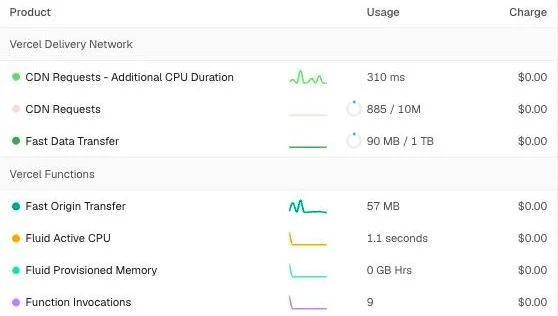
Vercel meters data to visitors (Fast Data Transfer) and data from functions (Fast Origin Transfer) as separate lines.
Supabase: uncached and cached egress
Supabase's egress documentation charges for "the network data transmitted out of the system to a connected client". That includes the Database API, Auth, Storage, Edge Functions, Realtime, Log Drains and the Shared Pooler. Cached egress is data served from Supabase's CDN on a cache hit, mostly Storage files. Everything else is uncached. The Free plan includes 5 GB of each; Pro and Team include 250 GB of each, then charge $0.09 per GB uncached and $0.03 per GB cached.
Vercel: Fast Data Transfer and Fast Origin Transfer
Vercel's CDN usage documentation defines Fast Data Transfer as data sent between the CDN and the visitor's device, and Fast Origin Transfer as data sent between the CDN and Vercel Functions. Vercel's pricing gives Hobby 100 GB and 10 GB respectively, with no option to buy more. Pro ($20 a month, including a $20 usage credit) includes 1 TB of Fast Data Transfer, then charges from $0.15 per GB, and charges Fast Origin Transfer from $0.06 per GB. London (lhr1) rates are $0.15 and $0.06. Pro teams can instead choose Flat Rate CDN, a fixed monthly price per capacity tier.
Railway: public egress and a free private network
Railway's pricing lists egress at $0.05 per GB for services, with free egress from its object storage. Egress is paid from the same usage credit as CPU and memory: $5 on Hobby and $20 on Pro. Services in one project can use the private network, which Railway's best practices guide says avoids "service-to-service egress costs".
Cloudflare Workers: no egress charge
Cloudflare's Workers pricing says: "There are no additional charges for data transfer (egress) or throughput (bandwidth)." Static asset requests are free and unlimited, and R2 storage has no egress charges; Containers are the exception. Cloudflare also runs the Bandwidth Alliance, whose member clouds commit to discounting or waiving data transfer fees for shared customers.
| Egress type | Price per GB |
|---|---|
| Vercel Fast Data Transfer (Pro, from) | |
| Supabase uncached egress (Pro) | |
| Vercel Fast Origin Transfer (Pro, from) | |
| Railway service egress | |
| Supabase cached egress (Pro) | |
| Railway private networking | |
| Cloudflare Workers |
Sources: Supabase, Egress; Vercel, Pricing; Railway, Pricing; Railway, Best practices; Cloudflare, Workers pricing
The per-GB price is only half the story. The allowance matters just as much.
- 250 GB uncached plus 250 GB cached egress a month on Supabase Pro (5 GB of each on Free)
- 1 TB Fast Data Transfer a month on Vercel Pro (100 GB on Hobby, which cannot buy more)
- 10 GB Fast Origin Transfer a month on Vercel Hobby; Pro bills it from $0.06 per GB
- $0 egress charge on Cloudflare Workers, with static asset requests free and unlimited
Sources: Supabase, Egress; Vercel, Pricing; Cloudflare, Workers pricing
Some quick maths shows why caching matters. On Supabase Pro, 1 TB of uncached egress costs $67.50 above the allowance (750 GB at $0.09). Served as cached egress, the same terabyte costs $22.50. On Vercel Pro, 2 TB of Fast Data Transfer costs about $150 above the allowance. On Railway, 2 TB of service egress is $100 of usage, partly covered by the plan credit. On Cloudflare Workers, the transfer is free.
Does traffic between my server and Supabase count as egress?
Yes. Supabase counts every byte it sends to any client, and your own server is a client. If your app renders pages on Vercel, Railway or Cloudflare and reads from Supabase, that data is Supabase egress before any visitor sees it.
On Vercel the same data can be metered twice more. A function that fetches 1 MB from Supabase and returns it uses 1 MB of Supabase egress, about 1 MB of Fast Origin Transfer and about 1 MB of Fast Data Transfer. Vercel also warns that Middleware can add Fast Origin Transfer a second time for one function request.
Railway's private network only helps when both ends sit in the same Railway project. A Supabase project is outside it. Likewise, a Cloudflare Worker sends pages to visitors for free, but every query it makes to Supabase still counts on the Supabase bill. Our guide to running Supabase with Cloudflare Workers covers the connection options. The fix is to cache responses at your host or the edge, so a popular page reads from Supabase once every few minutes rather than once per visitor.
What causes sudden egress spikes in AI-built apps?
AI coding tools write code that works for the person testing it. They rarely ask how much data each screen pulls, or how often. These are the patterns we see most:
- select * on large tables: every column, including long text and JSON, when the screen shows three fields.
- No pagination: lists load every row, so egress grows with the table.
- Full-size images: multi-megabyte phone photos served as thumbnails without resizing or caching.
- Realtime on everything: every change to a busy table pushed to every subscribed browser.
- Polling and refetching: components that refetch every few seconds or whenever the tab regains focus. Vercel names both as common causes of extra requests.
- Bots and scrapers: crawlers and scripts hitting pages and APIs around the clock.
- Open tables: a table without Row Level Security can be downloaded in full with the public key. That is a data leak first and an egress bill second; see our vibe-coded app security checklist.
- Writes that return whole rows, and backups or exports of every table through the pooler, run more often than needed.
| Cause | Fetch less data | Fetch less often | Shrink files | Stop unwanted traffic |
|---|---|---|---|---|
| select * on large tables | Yes | Partial | No | No |
| No pagination or limits | Yes | No | No | No |
| Full-size images and uploads | Partial | Yes | Yes | No |
| Realtime on every table | Yes | Yes | No | No |
| Polling and refetch on focus | No | Yes | No | No |
| Server re-fetching the same data per visit | No | Yes | No | No |
| Bots, scrapers and open tables | No | Partial | No | Yes |
| Writes that return whole rows | Yes | No | No | No |
| Backups and exports through the pooler | Yes | Yes | No | No |
Sources: Supabase, Egress; Supabase, Storage optimisations; Vercel, CDN pricing and usage
How do you find out what is using your egress?
Open each provider's usage page, find the day the line jumped, then match it to a deploy, a feature or a traffic source.
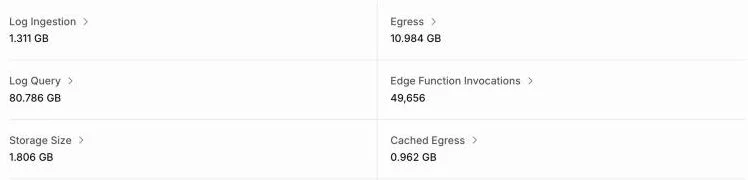
Supabase reports uncached and cached egress separately, and on Pro they are billed at different rates.
- Supabase: on the organisation's Usage page, pick the project and hover over a day in the Total Egress chart to see the split by service. Cached egress has its own chart. Query performance in the Advisors shows the most frequent queries, and the logs explorer shows the most requested API paths, though not yet their response sizes.
- Vercel: under Usage, filter the Fast Data Transfer chart by direction, project and region. The Fast Origin Transfer section splits incoming and outgoing data by project and can be filtered by invocations.
- Railway: check usage per service and set usage limits, an email alert and, if you want one, a hard limit that takes workloads offline.
- Cloudflare: egress is free, but Worker and zone analytics show request volumes and cached against uncached traffic. A surge there usually means more Supabase queries behind it.
If Supabase Database egress climbs in step with Vercel's outgoing Fast Origin Transfer, server code is fetching too much, too often. If Storage dominates, start with images. Supabase's Storage optimisation guide says "Images typically make up most of your egress."
How do you stop egress inflating your bill?
Work through this list in order. The early items are cheap and usually remove most of the waste.
- Set spend caps, budgets and usage alerts on every provider
- Select only the columns each screen needs
- Paginate every list and limit every query
- Resize and compress images, and cap upload sizes
- Serve Storage files through the CDN with a long cache-control
- Cache server responses at the edge or the host
- Serve static assets from Cloudflare Workers or a CDN
- Replace polling, and subscribe to Realtime narrowly
- Keep services on private networks and avoid cross-provider chatter
- Rate-limit bots and lock down open tables
1. Set caps and alerts first
Supabase's Spend Cap on Pro covers egress: extra usage is disallowed until the next billing cycle. Vercel's Spend Management alerts at 50%, 75% and 100% of a budget and can pause production deployments, but checks only every few minutes, so set it below your real limit. Decide in advance whether you would rather pay or go offline.
2 and 3. Fetch less data
Name the columns the screen shows and page through lists:
const { data } = await supabase
  .from('orders')
  .select('id, status, total, created_at')
  .order('created_at', { ascending: false })
  .range(0, 24);
Supabase also advises against returning the entire row from inserts and updates you do not need back. In supabase-js, only chain .select() after a write if the screen uses the result.
4 to 7. Shrink and cache
Resize images with Supabase's image transformations, for example getPublicUrl(path, { transform: { width: 400, quality: 70 } }), set a maximum upload size per bucket, and upload with a long cacheControl. On Pro and above Smart CDN is on automatically, so repeat downloads become cached egress at a third of the price. Add Cache-Control headers to server responses that are the same for every visitor; Vercel says this serves future requests from the CDN cache and cuts Fast Origin Transfer.
8 to 10. Talk less, privately, to fewer bots
Swap fixed-interval polling for Realtime on the one table that needs live updates, filtered to the current user. Keep app servers and databases on one provider's private network where possible. Add rate limits to API routes and Row Level Security to every table. A spike with no matching rise in sign-ups is a security signal, not just a cost.
Should you change hosting provider to avoid egress fees?
Sometimes, but rarely first. Fixing the code cuts egress everywhere; moving host only changes who charges for the last hop.
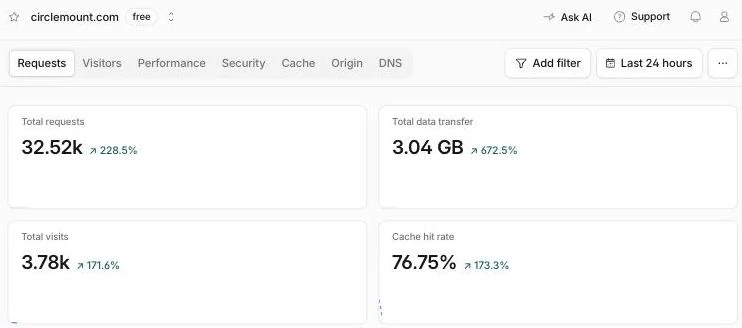
Data served from Cloudflare carries no egress charge, and a high cache hit rate keeps requests away from the database.
Cloudflare Workers is the strongest option when outbound traffic is the problem, because data transfer is not charged. This website runs as a TanStack Start app on a Cloudflare Worker that reads its content from Supabase. Vercel Pro's 1 TB allowance suits most small apps, but costs rise quickly beyond it; our Cloudflare Workers vs Vercel guide compares them. Railway is cost-effective when app and database share a private network, and expensive when a busy service sends lots of public traffic; see Railway vs Cloudflare and Vercel for example bills.
Whichever host you pick, Supabase egress stays the same, because it depends on what your code asks for. We have moved client apps off Lovable and solved egress cost problems on Railway, and the fix nearly always started in the queries. Taking a Lovable app live? Our Lovable to production guide covers hosting and Supabase settings together.
When is an egress spike a sign of a bigger problem?
When it has no obvious cause. If traffic, sign-ups and releases look normal but Database egress jumped, check the API logs for one client downloading large ranges of a table. That often means an open table or a leaked key, which is a potential UK GDPR breach as well as a cost. Close access first and count the cost second.
We can fix a vibe-coded app that is burning through egress, and our security audit checks the policies and keys that stop strangers downloading your data. For budgets, see how much it costs to fix a vibe-coded app.
Frequently asked questions
What are egress fees in cloud hosting?
Egress fees are charges for data leaving a provider's network, such as pages, API responses and images sent to users, or database results sent to your own server elsewhere. Providers include a monthly allowance and charge per gigabyte above it. Incoming data, called ingress, is usually free, so egress is where usage costs grow.
What counts as egress in Supabase?
Supabase counts all data it sends to any connected client, including your own server-side host. That covers the Database API, Auth, Storage, Edge Functions, Realtime, Log Drains and the Shared Pooler. Pro includes 250 GB of uncached and 250 GB of cached egress a month, then charges $0.09 and $0.03 per GB.
What is the difference between cached and uncached egress in Supabase?
Cached egress is data served from Supabase's CDN on a cache hit, mostly Storage files through the Smart CDN. Uncached egress is everything else, including database queries. On Pro each has a 250 GB allowance, and above it cached egress costs $0.03 per GB against $0.09 for uncached, so caching files cuts the price by two thirds.
Does Cloudflare charge for egress on Workers?
No. Cloudflare's Workers pricing says there are no additional charges for data transfer or bandwidth, and requests to static assets are free and unlimited. Containers have their own egress rates. Data a Worker fetches from Supabase or another provider is still billed by that provider, so caching those responses still matters.
What is Fast Data Transfer and Fast Origin Transfer on Vercel?
Fast Data Transfer is data sent between Vercel's CDN and the visitor's device. Fast Origin Transfer is data sent between the CDN and Vercel Functions. Pro includes 1 TB of Fast Data Transfer, then charges from $0.15 per GB, while Fast Origin Transfer starts at $0.06 per GB. Caching function responses reduces Fast Origin Transfer.
Does Railway charge egress between my services?
Not when they use the private network. Railway says services in the same project can talk over private networking without service-to-service egress costs, which makes it the right route for database traffic. Public egress from services costs $0.05 per GB and is paid from the same usage credit as CPU and memory.
How do I stop a surprise egress bill?
Turn on Supabase's Spend Cap, set a Vercel Spend Management budget or Railway usage limits, and check usage pages weekly. Then fix the causes: select only needed columns, paginate lists, resize and cache images, cache server responses, replace polling, rate-limit bots and make sure no table is open to the public key.
Sources
Checked on 21 November 2026. Product features and figures change quickly, so check the current source before you rely on a detail.
- Supabase documentation: Egress
- Supabase documentation: Storage optimisations
- Supabase documentation: Cost control and Spend Cap
- Vercel documentation: CDN pricing and usage
- Vercel pricing
- Vercel documentation: Spend Management
- Railway pricing
- Railway documentation: Best practices (private networking)
- Cloudflare documentation: Workers pricing
- Cloudflare: Bandwidth Alliance
Is egress inflating your bill?
We find what is sending the data, fix the queries, images and caching, and set the alerts that stop it happening again. Start with our vibe-coded app fixing service, or book a security audit if a spike looks like scraping. The initial app assessment is free, project work starts from £1,000 + VAT, and ongoing support plans start from £125 a month + VAT. Join the Circle to talk it through.